Fender Jaguar Controls: Switches & Knobs Guide
Unlock the full potential of your Fender Jaguar. A comprehensive guide to the rhythm circuit, lead circuit, strangle switch, and every knob on your offset guitar. Master your tone today.
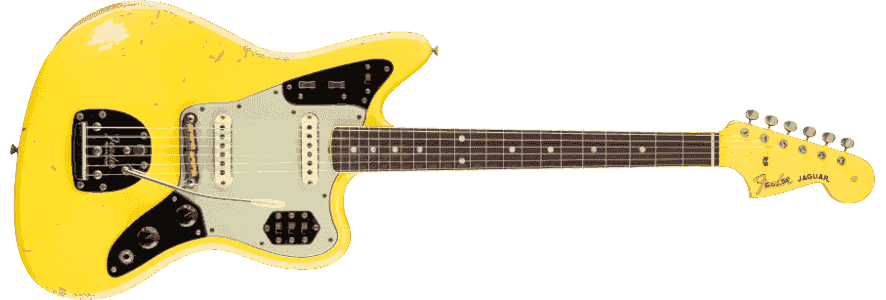
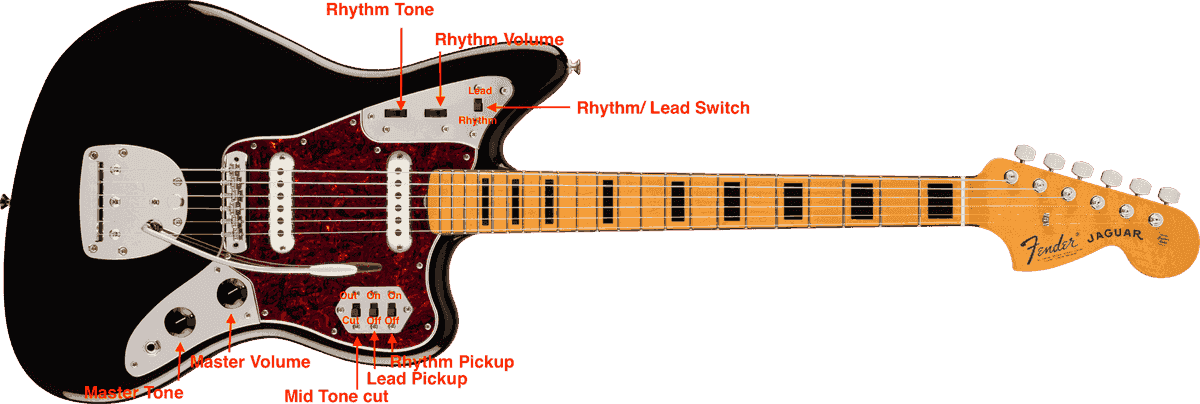 Figure 1: Jaguar Control Diagram. This overview shows the complete layout, highlighting the distinct Lead and Rhythm circuits, pickup locations, and tone controls.
Fender Jaguar Controls Explained: A Deep Dive into Switches and Knobs
The Fender Jaguar is arguably the most electronically complex guitar Leo Fender ever designed. With its chrome plates, slide switches, and roller knobs, it looks more like a spaceship dashboard than a musical instrument. For many players, these Fender Jaguar controls are a source of confusion—but for the initiated, they are the key to a universe of unique tones that no Stratocaster or Telecaster can touch.
If you've ever looked at your Jaguar and wondered, "What does this switch actually do?" or "Why is my guitar suddenly so quiet and dark?", this guide is for you. We're going to break down every single switch, knob, and circuit on the Fender Jaguar, explaining not just how they work, but how to use them to shape your sound.
🎸 Need to set up your Jaguar? The controls are only half the battle. Get our Fender Setup Cheat Sheet for the exact bridge and pickup heights you need.
Part 1: The Two Circuits (Lead vs. Rhythm)
The first thing to understand about Jaguar guitar controls is that the instrument has a split personality. It operates on two completely independent circuits: the Lead Circuit and the Rhythm Circuit.
You can only use one circuit at a time. The switch on the upper horn (the top chrome plate) determines which personality is in charge.
The Upper Horn Switch (The Circuit Selector)
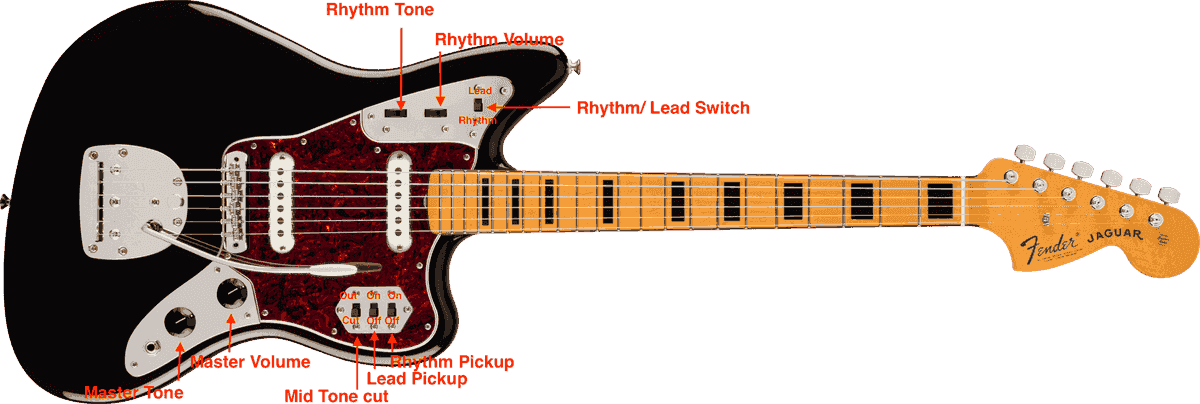
As clearly shown in Figure 2, the Rhythm/Lead Switch is located on the upper chrome plate.
- Lead Position (Down): You are in the Lead Circuit. The lower controls (volume, tone, and three pickup switches) are active.
- Rhythm Position (Up): You are in the Rhythm Circuit. The lower controls are effectively dead. Only the neck pickup is active, controlled by the two roller wheels.
This design allowed 1960s guitarists to preset a warm, mellow rhythm tone for comping chords, then instantly flip the switch down to engage a bright, biting lead tone for solos—without touching a volume knob.
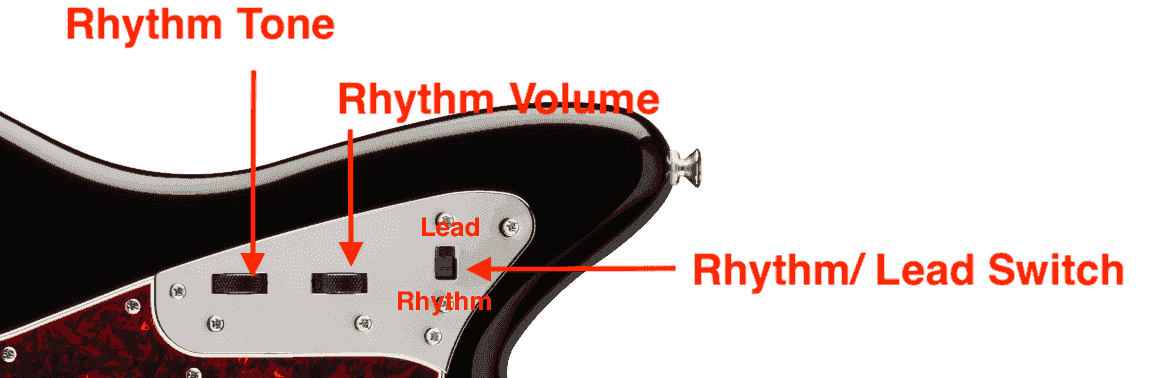 Figure 2: Jaguar Control Plate detailing the Rhythm/Lead switch and roller knobs.
Part 2: The Rhythm Circuit (Upper Controls)
Let's dive deeper into the Rhythm Circuit, often the most misunderstood part of the Jaguar.
When this circuit is active (Switch on "Rhythm"):
- Only the Neck Pickup is ON. You cannot use the bridge pickup. The pickup selector switches on the bottom plate do nothing.
- Darker Tone Cap: The signal runs through a separate volume and tone circuit with 50k or 1meg potentiometers (depending on year) and a capacitor value that rolls off significantly more high end.
The Roller Knobs
Referencing Figure 2, the two black roller wheels provide independent control when in Rhythm mode:
- Rhythm Tone: The roller on the left (closest to the neck).
- Rhythm Volume: The roller on the right (closest to the bridge).
💡 Pro Tip: The Rhythm Circuit is your "Instant Jazz" or "Instant Fuzz Tamer" switch. Because it's darker, it pairs beautifully with harsh fuzz pedals like a Big Muff, smoothing out the fizz for a thick, wall-of-sound tone.
Part 3: The Lead Circuit (Lower Controls)
When the upper switch is in the Lead position, you are in the Lead Circuit. This is the standard operating mode for most players, giving you access to both pickups and the famous "Mid Tone cut" switch.
This circuit is controlled by the three slide switches on the hexagonal chrome plate on the lower horn.
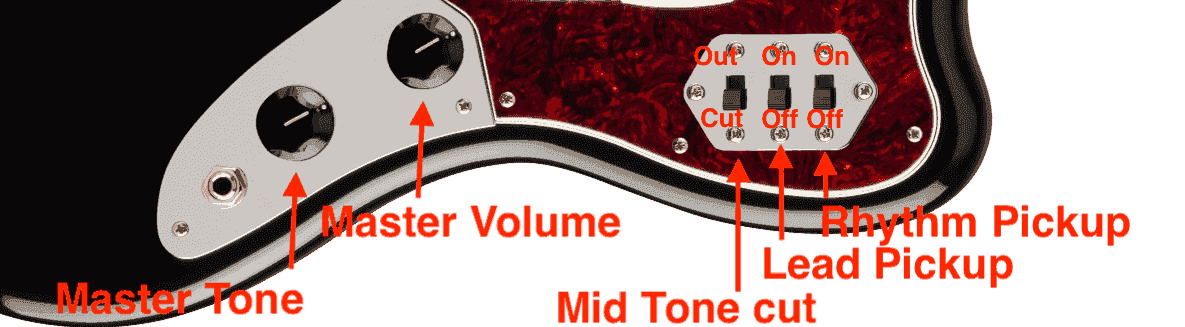 Figure 3: Jaguar Lower Control Switches. Note the specific labels for the Lead and Rhythm pickups, as well as the Mid Tone Cut.
The Three Hexagon Switches Explained
From right to left (Neck side to Bridge side) as depicted in Figure 3:
-
Rhythm Pickup Switch (Right):
- Up (On): Neck pickup is engaged.
- Down (Off): Neck pickup is disengaged.
-
Lead Pickup Switch (Middle):
- Up (On): Bridge pickup is engaged.
- Down (Off): Bridge pickup is disengaged.
⚠️ Warning: If both of these pickup switches are set to Off (Down), your guitar will be silent (kill switch effect), provided the Rhythm circuit is not engaged.
-
Mid Tone Cut ("Strangle") Switch (Left):
- Up ("Out"): The filter is bypassed. Normal full-frequency tone.
- Down ("Cut"): The high-pass filter is engaged. Bass frequencies are cut.
What is the "Mid Tone Cut"?
Often called the "Strangle" switch, this is technically a high-pass filter that introduces a small capacitor (usually 0.003µF) into the signal path.
-
"Out" Position: Full signal passes through.
-
"Cut" Position: Low frequencies are blocked, making the tone thinner and more "strangled."
-
Why use it? In the 1960s, it helped guitars cut through muddy mix on AM radio.
-
Modern use: It's perfect for tightening up high-gain distortion, removing the "mud" from a fuzz pedal, or getting that thin, percussive surf-rock "plonk."
 Buy on Amazon
Part 4: Master Volume and Tone
Located on the chrome strip nearest the output jack (see Figure 1), these are your standard controls for the Lead Circuit:
- Master Volume (Closest to strings): Controls the overall output level.
- Master Tone (Closest to jack): Controls the overall brightness.
Because Jaguars often use 1 Meg pots (compared to 250k on a Strat), the Lead circuit is exceptionally bright and piercing when widely open. This is a core part of the Jaguar's aggressive character.
Quick Cheat Sheet: Common Jaguar Settings
Don't get lost in the switches. Here are three classic settings to get you started:
1. The "Surf" Setting
- Circuit: Lead (Upper switch DOWN)
- Pickups: Rhythm ON, Lead ON (Right and Middle switches UP)
- Mid Tone Cut: Out (Left switch UP)
- Tone: Crystal clear, bell-like chime.
2. The "Nirvana" Grunt (Kurt Cobain Style)
- Circuit: Lead (Upper switch DOWN)
- Pickups: Rhythm OFF (Right switch DOWN), Lead ON (Middle switch UP)
- Mid Tone Cut: Out (Left switch UP)
- Note: Cobain famously taped over his switches to prevent accidental switching, but the bridge pickup bite is the essence of his sound.
3. The "Shoegaze Wall"
- Circuit: Rhythm (Upper switch UP)
- Roller Tone: Rolled back 50%
- Effect: Add a heavy fuzz and reverb. The darker circuit prevents the fuzz from sounding like angry bees, creating a massive texture.
Troubleshooting Common Jaguar Control Issues
1. "My Guitar Cuts Out When I Strum Hard"
This is often because you've hit the pickup selector switches with your hand.
- Fix: Many players reverse the switch plate or install lower-profile switches.
2. "The Rhythm Circuit is Too Dark/Muddy"
This is by design, but if it's unusable:
- Fix: You can swap the capacitor in the rhythm circuit for a lower value to brighten it up slightly. See our Jaguar Wiring Guide for full capacitor and pot swap instructions.
3. "My Bridge Pickup Sounds Thin and Screechy"
The 1 Meg volume pot lets through a lot of treble.
- Fix: Roll your Lead Tone knob down to about 8. Or, use the Rhythm circuit for warmer tones.
Frequently Asked Questions (FAQ)
What does the third switch on a Jaguar do?
Answer: The third switch on the lower plate is the "Mid Tone Cut" (or "Strangle") switch. When engaged (usually down, as shown in Figure 3), it cuts low-end frequencies, making the tone thinner and sharper—ideal for cutting through a mix or tightening up heavy fuzz.
Why does my Jaguar have two volume knobs?
Answer: The Jaguar has separate volume controls for its two circuits. The knob on the lower chrome plate controls the Lead Circuit (standard mode), while the roller wheel on the upper horn controls volume for the Rhythm Circuit (neck pickup only).
Can I use the bridge pickup in the Rhythm Circuit?
Answer: No. By design, the Rhythm Circuit (upper switch UP) automatically engages the neck pickup only and bypasses the lower toggle switches. To use the bridge pickup, you must switch back to the Lead Circuit (upper switch DOWN).
Is the Jaguar controls layout the same on all models?
Answer: While the vintage layout is described here (and shown in Figure 1), many modern models (like the Player Series or American Pro) have simplified controls. The American Pro, for example, replaces the slide switches with a 4-way blade selector. Always check your specific model's specs.
Conclusion: Master Your Machine
The Fender Jaguar's controls are not "clutter"—they are a powerful toolkit for sonic exploration. Once you understand the logic of the two circuits, you realize the Jaguar offers a versatility that few other guitars can match. From the darkest jazz warmth to the sharpest surf bite, it's all right there at your fingertips.
Now that you've mastered the electronics, make sure the rest of your guitar is up to par. A poorly set up bridge or incorrect pickup height can ruin even the best tone settings.
Related Posts
Jaguar Setup & Maintenance
- Ultimate Jaguar Setup Guide - Ensure your bridge and action are ready for action.
- Jaguar Tremolo Setup - Keep your offset in tune.
- Jaguar vs Jazzmaster - Understand the differences between the offset cousins.
Upgrades & Electronics
- Jaguar Wiring Guide - Volume, tone pot mods, treble bleeds, and rhythm circuit upgrades
- Best Strings for Jaguar - Heavier strings are often key for Jaguar stability.